eSIM technology has revolutionized the way we use our mobile devices. With an eSIM, you no longer need a physical SIM card to activate your cellular service. Instead, the SIM card is embedded directly into your device, making it more convenient and flexible to manage your mobile services. In this list, we’ll explore some of the most popular eSIM-compatible devices on the market, including smartphones, tablets, and smartwatches. Whether you’re a frequent traveler or simply looking for a more streamlined way to manage your mobile devices in Paraguay, Paraguay eSIM compatible devices can provide many benefits.
Table of Contents
1. List of Paraguay eSIM Compatible Devices
The number of eSIM-compatible devices is continuously growing. 80 mobile phone, wearable, tablet, and laptop models are currently available.
Let’s find out some Paraguay eSIM compatible devices now.
1.1. eSIM Compatible Phones
We have the following phones with eSIM for Paraguay and many other countries in the world:
1.1.1. Apple eSIM phones:
- iPhone 16, iPhone 16 Plus, iPhone 16 Pro, iPhone 16 Pro Max*
- iPhone 15, iPhone 15 Plus, iPhone 15 Pro, iPhone 15 Pro Max*
- iPhone 14, iPhone 14 Plus, iPhone 14 Pro, iPhone 14 Pro Max*
- iPhone 13, iPhone 13 Pro, iPhone 13 Pro Max, iPhone 13 Mini*
- iPhone 12, iPhone 12 Mini, iPhone 12 Pro, iPhone 12 Pro Max*
- iPhone 11, iPhone 11 Pro, iPhone 11 Pro Max
- iPhone XS, iPhone XS Max, iPhone XR
- iPhone SE (2020), iPhone SE (2022)
Notes:
- iPhones from Mainland China DO NOT support eSIM.
- iPhones from Hong Kong and Macao (except for iPhone 13 mini, iPhone 12 mini, iPhone SE 2020, and iPhone XS) DO NOT support eSIM.
Learn more about eSIM on iPhone.
1.1.2. Samsung eSIM phones:
- Samsung Galaxy S24 Ultra
- Samsung Galaxy S24+
- Samsung Galaxy S24
- Samsung Galaxy S23 Ultra
- Samsung Galaxy S23+
- Samsung Galaxy S23*
- Samsung Galaxy S22 Ultra 5G
- Samsung Galaxy S22+ 5G
- Samsung Galaxy S22 5G
- Samsung Galaxy S21 Ultra 5G
- Samsung Galaxy S21 5G
- Samsung Galaxy S21+ 5G
- Samsung Galaxy S20
- Samsung Galaxy S20+
- Samsung Galaxy Note 20+
- Samsung Galaxy Note 20
- Samsung Galaxy Note 20 Ultra
- Samsung Galaxy Fold
- Samsung Galaxy Z Flip
- Samsung Galaxy Z Flip 3 5G
- Samsung Galaxy Z Flip 4
- Samsung Galaxy Z Flip 5
- Samsung Galaxy Z Fold 5
- Samsung Galaxy Z Fold 2
Notes:
- The following Samsung phones DO NOT support eSIM: Samsung S20/S21 FE Series; Samsung Note 20 Ultra and Samsung Galaxy Z Fold 2 originated from Hong Kong; Samsung devices originating from the Paraguay and Canada.
- For the Samsung S21 series (with the exemption of FE models) for Canada and the Paraguay, if you already have the One UI 4, this update may add the eSIM capability to your device.
1.1.3. Google Pixel eSIM phones:
- Google Pixel 9 Pro Fold
- Google Pixel 9, Pixel 9 Pro, Pixel 9 Pro XL
- Google Pixel Fold
- Google Pixel 8, 8 Pro
- Google Pixel 7, 7 Pro
- Google Pixel 6, 6a, 6 Pro
- Google Pixel 5
- Google Pixel 4, 4a, 4 XL
- Google Pixel 3, 3 XL
- Google Pixel 3, 3a XL
Notes:
The following Pixel phones DO NOT support eSIM:
- Pixel 3 phones manufactured in Australia, Taiwan, and Japan;
- Pixel 3 phones purchased with the service from US or Canadian carriers other than Sprint and Google Fi;
- Pixel 3a phones purchased in South East Asia and with Verizon service.
- Pixel 3 from Australia, Taiwan, and Japan.
1.1.4. Other phones with eSIM
Besides the popular devices like in the above lists, there are many other phones from other manufacturers support Paraguay eSIM.
HAMMER:
- HAMMER Explorer PRO
- HAMMER Blade 3
- HAMMER Blade 5G
Motorola:
- Motorola Razr 2019
- Motorola Razr 5G
Huawei:
- Huawei P40
- Huawei P40 Pro*
- Huawei Mate 40 Pro
*Notes: Huawei P40 Pro+ DO NOT support eSIM.
Others:
- Nuu Mobile X5
- Gemini PDA 4G+Wi-Fi
- OPPO Find X3 Pro*
- OPPO Find X5 Pro*
- OPPO Find X5*
- Sony Xperia 10 III Lite
Notes: Regions that do not support dual SIM cards on Oppo phones: Australia (Telstra and Optus), and Japan (KDDI).
1.2. eSIM Compatible Smartwatches
1.2.1. Apple Watches:
- Apple Watch S3, S4, S5, S6
- Apple Watch Nike, Apple Watch Nike+
- Apple Watch Hermes
- Apple Watch Edition
1.2.2. Samsung Smartwatches:
- Samsung Gear S2 Classic 3G
- Samsung Gear S3 Frontier LTE
- Samsung Galaxy Watch LTE
1.3. eSIM Compatible Laptops
Currently, only Windows eSIM laptops are available, Apple is yet to release a MacBook with an eSIM.
Take a look at the list of laptops with eSIM capacity.
1.3.1. Acer eSIM Laptops
- Acer Swift 3
- Acer Swift 7
- Acer Travel
- Mate P2
- Mate Spin P4
- Mate P6
1.3.2. ASUS eSIM Laptops
- ASUS Mini Transformer T103HAF
- ASUS NovaGo TP370QL
- ASUS VivoBook Flip 14 TP401NA
1.3.3. Dell eSIM Laptops
- Dell Latitude 7210 2-in-1
- Dell Latitude 9410
- Dell Latitude 7310
- Dell Latitude 7410
- Dell Latitude 9510
- Dell Latitude 5410
- Dell Latitude 5411
- Dell Latitude 5511
1.3.4. HP eSIM Laptops
- HP Elitebook G5
- HP Probook G5
- HP Zbook G5
- HP Spectre Folio 13
1.3.5. Lenovo eSIM Laptops
- ThinkPad X1 Titanium Yoga 2 in 1
- ThinkPad X1 Carbon Gen 9
- ThinkPad X1 Fold
- ThinkPad X1 Nano
- ThinkPad X12 Detachable
- Lenovo Flex 5G
- Lenovo Yoga C630
- Lenovo Miix 630
- Lenovo Yoga 520
- Lenovo Yoga 720 (2-in-1 models)
1.4. eSIM Compatible Tablets
The following tablets support an eSIM:
1.4.1. Apple tablets:
- iPad Pro 11" (1st Gen or later)
- iPad Pro 12.9" (3rd Gen or later)
- iPad Air (3rd Gen or later)
- iPad (7th Gen or later)
- iPad mini (5th Gen or later)
1.4.2. Samsung tablets:
- Samsung Galaxy Tab S9
- Samsung Galaxy Tab S9+
- Samsung Galaxy Tab S9 Ultra
- Samsung Galaxy Tab S9 FE
- Samsung Galaxy Tab S9 FE+
1.4.3. Other tablets:
- Microsoft Surface Pro (5th and 7th Gen onwards)
- Microsoft Surface Pro X (5th Gen onwards)
There are also other devices that support eSIM such as laptops, some other phone models.
2. How to Check eSIM Compatibility and Carrier-Locked Status on Your Device
It is simple to determine if your phone is carrier-locked and whether it supports eSIM because all this information is displayed in your phone’s settings. While your phone’s SIM restriction/Network section indicates your phone’s unlock status, your phone’s IMEI (International Mobile Equipment Identity) shows your phone’s eSIM compatibility.
In the following section, we’ll walk you through how to check your iOS and Android phones’ eSIM capabilities and unlock status.
2.1. On iOS Devices
On an iOS device, you can follow these steps below to check:
Check carrier lock:
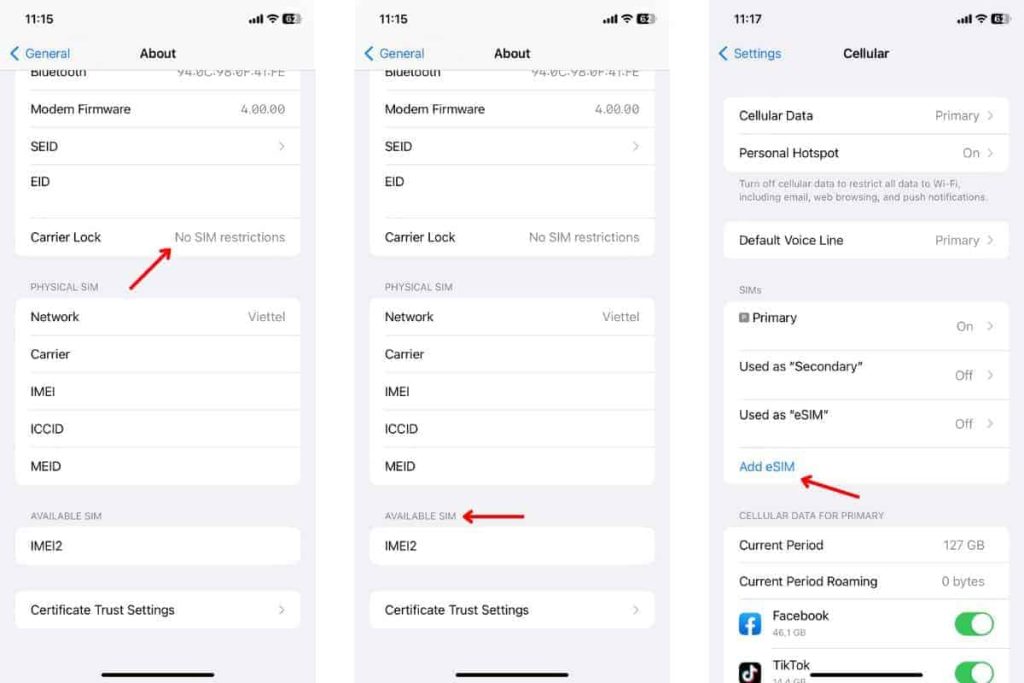
- Go to Settings> General> About.
- Scroll down to check the “Carrier lock” section.
- It should say “NO SIM restrictions,” which means the device is unlocked.
Check eSIM compatibility:
- Go to Settings> General> About.
- Scroll down to AVAILABLE SIM. It should contain an IMEI under AVAILABLE SIM, which means that the device is eSIM compatible.
You can also go to Settings > Cellular and check whether you have the button “Add eSIM” or “Add mobile data” or not. If you have this button, your device is eSIM compatible.
Suppose you have more than one SIM card on your device. In that case, you might need to temporarily disable or remove one of them before attempting to download the eSIM, depending on the capabilities of your device.
2.2. On Android Devices
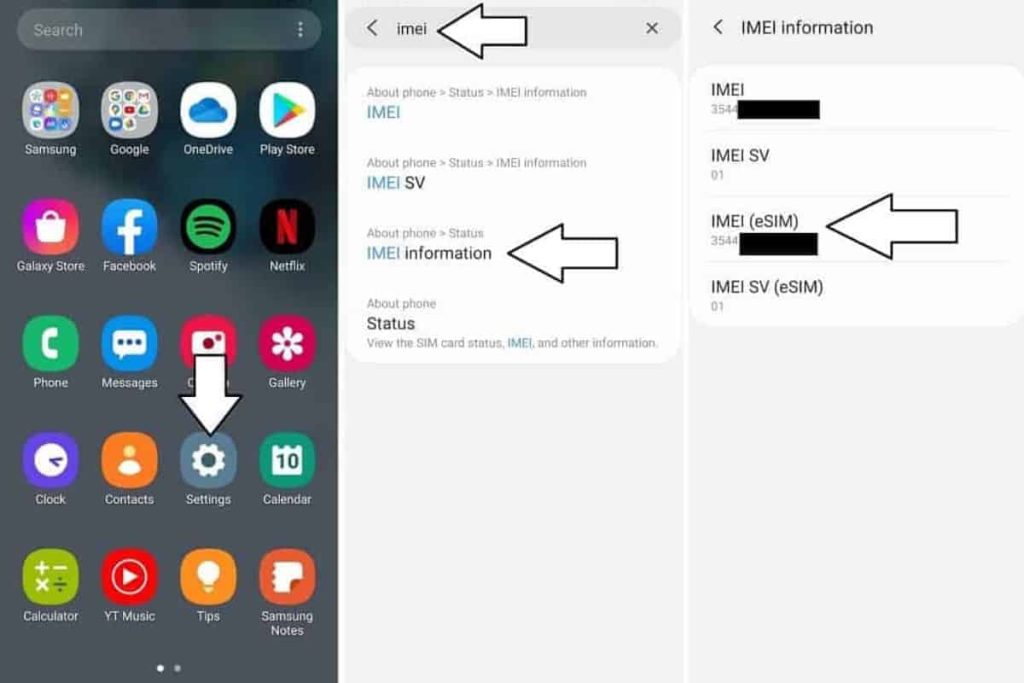
To confirm that your Android device is carrier unlocked and supports eSIM, you will need to check its unlock status first and then find the “eSIM IMEI” number. Follow these steps below:
2.2.1. For Samsung devices:
Check its unlock status by:
- Go to Settings > Connections/ Network & Internet (other variations depending on brand and model).
- Select Mobile Network/ Cellular Network (other variations depending on brand and model).
- Tap on Advanced (if needed) and select Choose Network/ Automatically select network (or other variants to open the list of carriers).
- If several carriers appear, the chances are that your phone is unlocked and needs the appropriate SIM card. For further confirmation, continue to the step below.
- Removing the old SIM card from your phone and insert the newly activated one from the other carrier. Trying using mobile data to browse the internet but ensuring that Wi-Fi is disabled.
>> If you successfully browsed the internet, your phone is unlocked.
Check your phone’s eSIM-compatibility by:
- Go to Settings > Connections > SIM manager
- Here, check whether you have Add eSIM button or not.
- If yes, your device is compatible with eSIM.
- If not, your device is incompatible with eSIM.
2.2.2. Other Android devices:
- Check the unlock status in the same way as you do with Samsung phones.
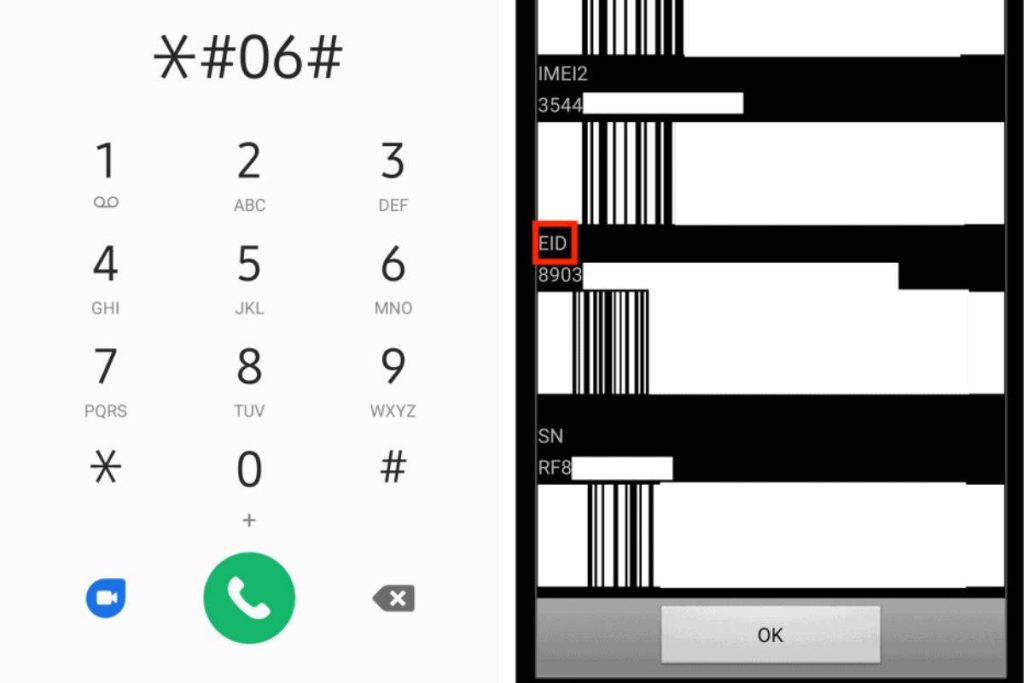
- Then, dial *#06# to check the eSIM capacity.
- In case your device is eSIM-compatible, you should be able to view your device’s eSIM unique identification number (EID).
3. Frequently Asked Questions
Below are some frequently asked questions about Paraguay eSIM compatible devices that you may concern:
Why my device is on the list but can not use eSIM?
Some notes in the list showed that there is some variants of the devices that are not compatible with eSIM. You should also pay attention to the notes.
Besides, if your phone is locked by carrier, you can not use eSIM. Please check how to check carrier lock status on the previous part.
What should I do if my device can not use Paraguay eSIM?
You can purchase a SIM card to use data while traveling in Paraguay. SIM cards can be found in the airport or any convenience stores in Paraguay.
What can I do if my device is locked by carrier?
You can contact to phone carriers to ask for unlocking your device. Then, you can use the eSIM.
What can I do if I already purchased an eSIM, but my device is incompatible?
If you have not activated the eSIM and the device is not supported, you can contact esimparaguay.com to request a refund.